
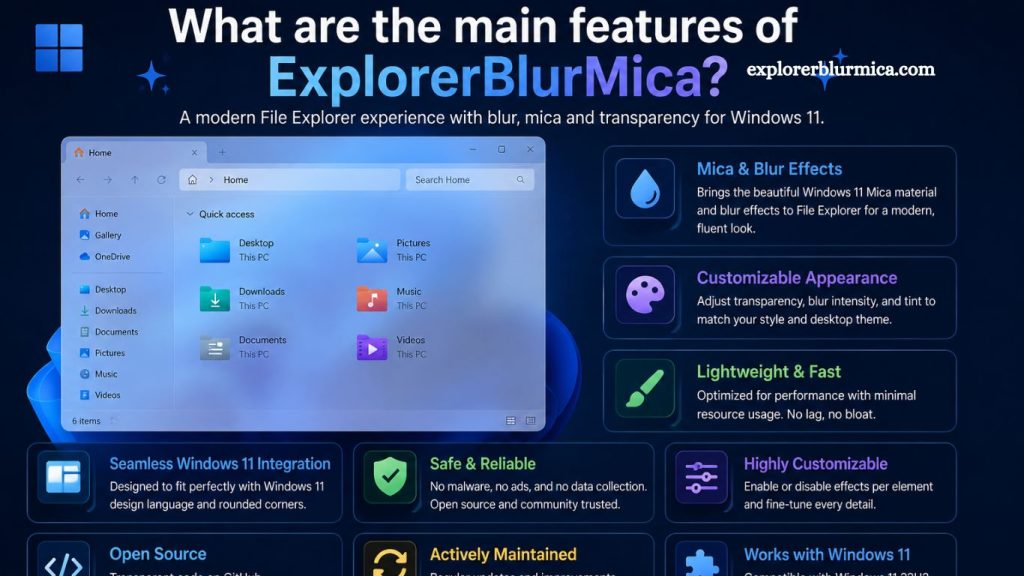
ExplorerBlurMica is a modern customization enhancement that refines the Windows Explorer experience by introducing blur and Mica-style effects inspired by Microsoft’s Fluent Design system. Users seeking a cleaner, more immersive interface often turn to this tool to transform Windows’ default look into something more elegant, transparent, and visually appealing. This article explains its core features, performance impact, customization options, and practical benefits in detail.
Modern Mica and Acrylic Visual Integration
ExplorerBlurMica delivers a refined Mica effect that blends background wallpaper tones into the File Explorer interface. This visual approach creates a soft, dynamic transparency that adapts to system themes. Acrylic blur support further enhances depth by simulating real-time background defocusing, giving windows a layered, glass-like appearance.
Visual continuity improves significantly when users switch between applications. Interface elements feel less rigid, while content remains clearly readable. Aesthetic consistency aligns closely with Windows 11 design principles, making the system feel more unified and polished.
Read More: ExplorerBlurMica vs MicaForEveryone: Key Differences Explained
Lightweight System Resource Usage
Performance optimization stands as a key feature of ExplorerBlurMica. Efficient code execution ensures minimal CPU and RAM consumption even when blur effects remain active across multiple windows. Users experience visual upgrades without noticeable slowdowns during multitasking or file navigation.
Background processing stays lightweight, allowing older hardware to benefit from modern UI enhancements. System responsiveness remains stable even under extended usage sessions, supporting productivity-focused environments.
Advanced Transparency Customization
Customization options provide users full control over transparency levels and blur intensity. ExplorerBlurMica allows fine-tuning of visual depth, enabling subtle or pronounced effects depending on preference. Users can adjust the opacity to match the wallpaper’s brightness or personal aesthetic goals.
Real-time preview functionality helps evaluate changes instantly without restarting Explorer. Flexibility in design ensures compatibility with both minimalistic setups and highly stylized desktop environments.
Seamless Windows Explorer Integration
Deep integration with Windows Explorer ensures smooth operation without altering core system files. ExplorerBlurMica modifies visual layers rather than replacing system components, thereby preserving stability and reducing the risk of system conflicts.
File browsing remains unaffected, while interface enhancements take effect instantly. Navigation between folders, drives, and system directories continues without disruption, maintaining a native Windows experience enhanced by modern visuals.
Fluent Design Alignment
Design consistency plays a major role in the functionality of ExplorerBlurMica. The tool aligns closely with Microsoft’s Fluent Design System, incorporating light diffusion, shadow depth, and material layering effects. This alignment ensures the interface feels native rather than externally modified.
UI elements maintain clarity even with transparency enabled. Icons, text labels, and navigation panels remain readable while benefiting from subtle background blending.
Multi-Theme Compatibility
ExplorerBlurMica supports both light and dark modes, adapting seamlessly to system-wide theme changes. Color balancing adjusts automatically to maintain contrast and readability across different environments.
Dynamic theme detection ensures that visual effects remain consistent regardless of wallpaper or accent color selection. Users can switch themes without manually reconfiguring blur settings, improving usability and convenience.
Improved Aesthetic Productivity Experience
Enhanced visual design contributes to a more focused workspace. Soft blur effects reduce visual clutter, helping users concentrate on active tasks. File management becomes more engaging due to improved interface depth and spatial layering.
Productivity benefits extend to multitasking environments where multiple windows remain open simultaneously. Visual separation between elements improves workflow clarity and reduces cognitive load.
Stability and Compatibility Focus
System stability remains a priority in ExplorerBlurMica development. Compatibility with recent Windows versions ensures reliable performance across updates. The tool avoids invasive modifications, reducing the likelihood of crashes or system errors.
Regular optimization ensures alignment with Windows Explorer updates. Users benefit from continued functionality even as Microsoft introduces interface changes in newer builds.
Custom Animation and Transition Effects
Smooth transitions enhance the overall experience when opening folders, switching directories, or resizing windows. ExplorerBlurMica introduces subtle animation refinements that improve perceived performance and visual fluidity.
Motion effects remain controlled and non-intrusive, ensuring that system responsiveness is not compromised. Transition timing can often be adjusted to match user preference, allowing further personalization.
Enhanced Desktop Personalization
ExplorerBlurMica supports a highly personalized desktop environment by allowing users to shape the visual identity of Windows Explorer. Wallpaper blending, accent synchronization, and interface softening create a unified aesthetic across the operating system.
Personalization options empower users to design a workspace that reflects individual style while maintaining professional usability. This balance makes the tool suitable for both casual users and productivity-focused professionals.
Low Barrier to Entry and Easy Configuration
Installation and configuration remain straightforward, allowing users to enable features without technical complexity. Simple toggles and settings panels guide customization without requiring advanced system knowledge.
Default configurations provide immediate visual improvement, while advanced settings unlock deeper control for experienced users. Accessibility ensures adoption across a wide range of user skill levels.
Frequently Asked Questions
What is ExplorerBlurMica used for?
ExplorerBlurMica enhances Windows Explorer by adding Mica and blur effects, improving visual appearance, and modernizing the interface.
Does ExplorerBlurMica affect system performance?
ExplorerBlurMica uses minimal resources, offeringithout slowing Windows Explorer or the overall system.
Is ExpsystemlurMica compatible with Windows 11?
ExplorerBlurMica is designed primarily for Windows 11 and integrates seamlessly with its Fluent Design system and interface.
Can I customize blur intensity in ExplorerBlurMica?
ExplorerBlurMica allows users to adjust transparency and blur levels to match personal preferences and desktop aesthetics.
Does ExplorerBlurMica change system files?
ExplorerBlurMica integrates without modifying core system files, helping maintain stability and reduce the risk of system issues.
Is ExplorerBlurMica easy to install?
ExplorerBlurMica offers a simple setup process with straightforward configuration options suitable for both beginners and advanced users.
Does ExplorerBlurMica support dark and light themes?
ExplorerBlurMica supports both dark and light modes, automatically adapting visual effects to match system-wide theme settings.
Conclusion
ExplorerBlurMica delivers a refined visual upgrade for Windows Explorer by combining Mica blur effects, transparency control, and Fluent Design alignment. Its lightweight architecture ensures smooth performance while enhancing overall interface aesthetics. Strong customization options, seamless integration, and theme adaptability make it a practical solution for users seeking a modern, clean, and visually engaging Windows experience.