
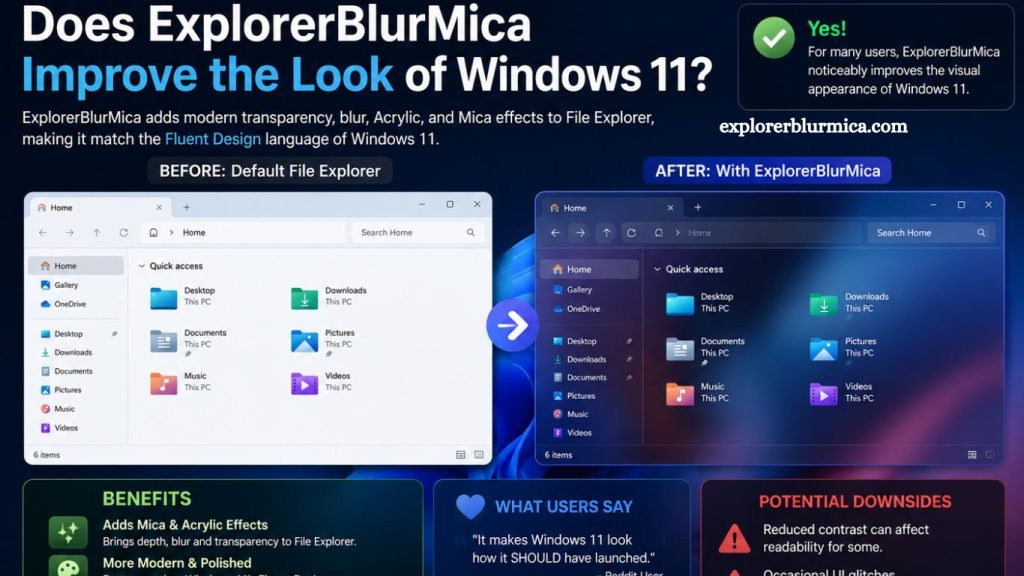
Windows 11 introduced a major shift in Microsoft’s design language, emphasizing transparency, soft blur effects, rounded corners, and a modern visual system. While many users appreciate the aesthetic upgrade over Windows 10, others still look for ways to further refine or enhance the interface. One tool that has gained attention in this space is ExplorerBlurMica, a customization utility designed to modify and improve the visual experience of Windows 11’s File Explorer and system UI elements.
This article explores whether ExplorerBlurMica truly improves the look of Windows 11, how it works, what benefits it offers, and whether it is worth using for users who want a cleaner and more modern desktop environment.
Understanding the Windows 11 Visual Design
Before evaluating ExplorerBlurMica, it is important to understand the design foundation of Windows 11.
Microsoft introduced the “Mica” material effect in Windows 11, a dynamic visual style that blends background colors with application surfaces. Unlike older transparency effects, Mica is performance-optimized and adapts to wallpaper colors, creating a subtle depth effect across system apps.
Read More: ExplorerBlurMica: Key Features Explained
File Explorer, Settings, and several native apps use this design approach. However, some users feel that the default implementation lacks consistency or visual refinement, especially in File Explorer, which still carries legacy design elements from older Windows versions.
This gap between modern UI principles and legacy components is where ExplorerBlurMica becomes relevant.
What Is ExplorerBlurMica?
ExplorerBlurMica is a third-party customization tool designed to enhance the appearance of Windows 11, specifically targeting File Explorer and system UI blur effects. It modifies the interface to better align with Microsoft’s Fluent Design language by improving transparency, blur depth, and visual consistency.
The tool is commonly used by users who want:
- A more modern File Explorer appearance
- Stronger blur and transparency effects
- A unified design across system windows
- A cleaner, less rigid UI experience
Unlike heavy system modifications, ExplorerBlurMica focuses mainly on visual refinement rather than functional changes.
How ExplorerBlurMica Works
ExplorerBlurMica applies visual enhancements by adjusting how Windows renders specific UI elements. It typically modifies the File Explorer window and sometimes other system components to introduce improved blur layers and better integration with Mica effects.
Key improvements often include:
- Enhanced background blur intensity
- More consistent transparency behavior
- Improved blending between the window and the desktop wallpaper
- Reduced visual harshness in interface elements
These changes are designed to make Windows 11 feel more fluid and visually cohesive without altering core system functionality.
Visual Improvements in Windows 11
The primary reason users install ExplorerBlurMica is to enhance aesthetics. The default Windows 11 interface already looks modern, but some inconsistencies remain, especially in older system components.
Cleaner File Explorer Design
File Explorer is one of the most frequently used tools in Windows, yet it retains a somewhat traditional layout. ExplorerBlurMica helps modernize it by adding smoother blur effects and better visual integration with Windows 11’s design language.
The result is a more polished interface that feels closer to native Windows 11 apps like Settings or Microsoft Edge.
Stronger Depth and Transparency
Windows 11 uses subtle transparency, but it is often minimal. ExplorerBlurMica enhances this effect, creating a stronger sense of depth between windows and background elements. This makes multitasking visually more engaging and less flat.
Improved Consistency Across UI Elements
One of the biggest complaints among users is inconsistent design across Windows apps. Some windows use modern Mica effects, while others appear more traditional. ExplorerBlurMica reduces this inconsistency by applying a unified visual style.
User Experience Impact
Beyond aesthetics, ExplorerBlurMica can influence how users perceive and interact with Windows 11.
A More Modern Feel
Users often describe the improved interface as more premium and visually refined. The added blur and transparency give the operating system a smoother and more contemporary feel.
Reduced Visual Clutter
By softening harsh edges and improving layering, the interface feels less cluttered. This can help users focus more on content rather than window borders and UI noise.
Better Desktop Integration
With enhanced transparency, windows blend more naturally with wallpapers. This creates a more immersive desktop environment, especially for users who prefer custom backgrounds.
Performance Considerations
While ExplorerBlurMica is primarily visual, performance is a key concern for any system modification tool.
In most cases:
- The impact on performance is minimal on modern hardware
- Systems with integrated graphics may experience slight overhead
- Proper configuration avoids noticeable slowdowns
Since Windows 11 already uses hardware-accelerated effects, ExplorerBlurMica typically works within existing rendering systems rather than replacing them.
However, users on older devices should always test performance before full adoption.
Compatibility and Stability
ExplorerBlurMica is designed specifically for Windows 11, and compatibility may vary depending on system updates.
Potential considerations include:
- Windows updates may temporarily affect functionality
- Certain system builds may require updates to the tool
- Some antivirus software may flag system modifications as suspicious
Users should ensure they download the tool from trusted sources and follow installation instructions carefully.
Advantages of Using ExplorerBlurMica
ExplorerBlurMica offers several clear benefits for users focused on visual customization:
Enhanced Aesthetic Appeal
The most noticeable improvement is the refined and modern look of File Explorer and system windows.
Better Design Consistency
It helps align older system elements with Windows 11’s modern Fluent Design language.
Lightweight Customization
Unlike full theme packs or system overhauls, it focuses on specific visual improvements.
Improved User Satisfaction
Users who value aesthetics often find the overall desktop experience more enjoyable.
Limitations to Consider
Despite its advantages, ExplorerBlurMica is not a perfect solution.
Limited Functional Changes
It does not improve performance or add new system features.
Update Dependency
Windows updates may require reconfiguration or updates to tools.
Not Official Microsoft Software
As a third-party tool, it lacks official support and may carry minor risks if misused.
Who Should Use ExplorerBlurMica?
ExplorerBlurMica is best suited for:
- Users who prioritize desktop aesthetics
- Windows 11 enthusiasts who enjoy customization
- Individuals seeking a more polished File Explorer experience
- Users with mid-range or high-end systems
It may not be ideal for:
- Users focused strictly on system stability
- Enterprise environments with strict IT policies
- Devices with very limited hardware resources
Frequently Asked Questions
What is ExplorerBlurMica in Windows 11?
ExplorerBlurMica is a third-party customization tool that enhances Windows 11 visuals by improving blur and transparency effects, especially in File Explorer.
Does ExplorerBlurMica improve Windows 11 performance?
No, it focuses only on visual enhancements. Any performance impact is minimal on modern systems.
Is ExplorerBlurMica safe to use?
It is generally safe when downloaded from trusted sources, but it is not an official Microsoft tool.
Which part of Windows 11 does ExplorerBlurMica affect most?
It mainly enhances File Explorer, improving its transparency, blur, and overall design consistency.
Do I need advanced technical skills to use ExplorerBlurMica?
Basic installation steps are usually simple, but users should follow instructions carefully to avoid issues.
Can Windows updates affect ExplorerBlurMica?
Yes, major Windows updates may temporarily break compatibility or require updates to tools.
Is ExplorerBlurMica worth using?
It is worth using for users who want a more modern, polished, and visually refined Windows 11 interface.
Conclusion
ExplorerBlurMica enhances the visual appeal of Windows 11 by refining blur effects, improving transparency, and creating a more unified interface design. It does not change system performance or core functionality, but it significantly upgrades the overall aesthetic experience, especially in File Explorer. For users who value a cleaner, modern, and visually consistent desktop environment, it offers a noticeable improvement over the default Windows 11 appearance.