
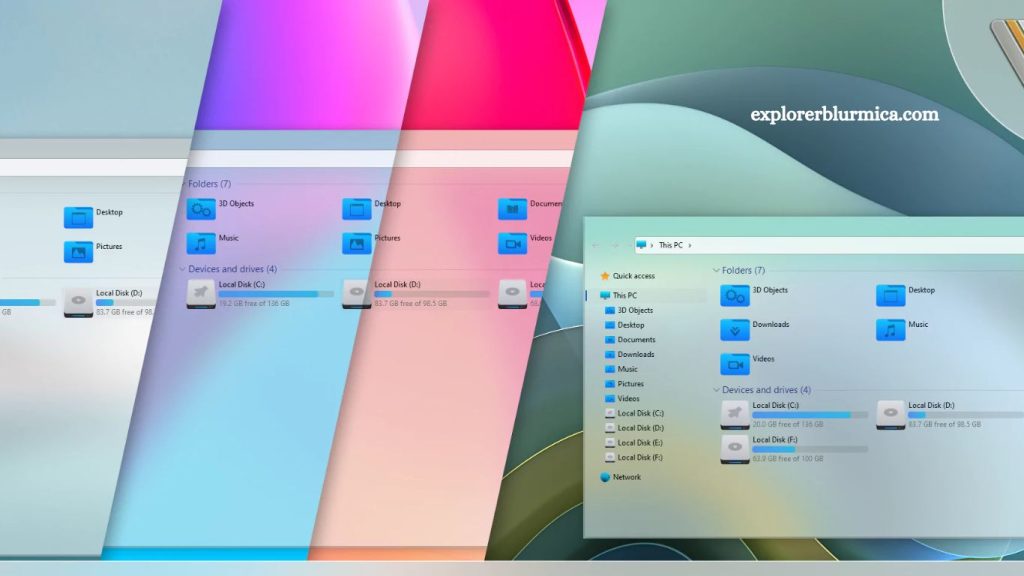
ExplorerBlurMica has gained attention among Windows customization enthusiasts seeking a modern, translucent interface similar to Windows 11’s visual style. Many users running older systems ask a common question: Does ExplorerBlurMica work on Windows 10? The answer depends on the system architecture, version limitations, and the degree to which the tool integrates with the Windows Desktop Window Manager (DWM). Understanding compatibility, requirements, and practical alternatives helps set realistic expectations before installation.
What ExplorerBlurMica Does in Windows Customization
ExplorerBlurMica is a customization utility that adds a modern blur and acrylic-style effect to Windows File Explorer and other system UI elements. The tool attempts to replicate or extend visual features inspired by Windows 11’s Mica material design, which blends transparency, blur, and wallpaper-based color tones.
Windows 11 includes native support for Mica effects through its updated UI framework. Windows 10, however, relies on older visual systems such as Acrylic blur and classic DWM effects. ExplorerBlurMica bridges this gap by injecting or modifying UI rendering behavior to simulate a similar aesthetic.
Read More: Install ExplorerBlurMica: Step-by-Step Guide
The primary appeal comes from users who prefer Windows 10 stability but want a refreshed, modern interface.
Windows 10 vs Windows 11 Visual Architecture
Compatibility issues originate from differences in system design between Windows 10 and Windows 11.
Windows 11 integrates:
- Native Mica material effects
- Updated Explorer UI framework
- Modernized WinUI components
- Enhanced DWM rendering pipeline
Windows 10 includes:
- Limited Acrylic blur effects
- Legacy Explorer interface
- Older Win32-based UI components
- Reduced support for modern UI layering
ExplorerBlurMica relies on UI behaviors that are either partially missing or differently implemented in Windows 10. This structural gap directly impacts functionality.
Does ExplorerBlurMica Officially Support Windows 10?
ExplorerBlurMica is primarily designed for Windows 11 environments. Most development focuses on enhancing or modifying Windows 11 Explorer visuals rather than on extending full backward compatibility.
Windows 10 support is typically:
- Partial
- Experimental in some builds
- Dependent on third-party modifications
- Not guaranteed for all versions of Windows 10
Some users report partial success using older releases or modified builds, but stability varies significantly. File Explorer crashes, inconsistent blur rendering, or performance drops can occur when forcing compatibility on Windows 10 systems.
Why ExplorerBlurMica Struggles on Windows 10
Several technical limitations explain why full compatibility is difficult.
Missing Mica Material Framework
Windows 10 does not include the Mica system layer. ExplorerBlurMica depends on rendering logic that aligns with Windows 11’s design language. Without this foundation, the effect becomes simulated rather than native.
Older Explorer Shell
Windows 10 File Explorer is built on a legacy architecture. Modifying its interface requires deeper system hooks, increasing the risk of instability.
DWM Differences
Desktop Window Manager behavior differs between Windows versions. Blur and transparency effects are handled differently, limiting how ExplorerBlurMica can apply consistent visuals.
Security Restrictions
Windows 10 includes stricter protections around system file injection and UI modification. These protections may block or limit ExplorerBlurMica functionality.
Installation Behavior on Windows 10
Users attempting to install on Windows 10 often encounter mixed results depending on the system build and configuration.
Common outcomes include:
- Partial blur effect applied only to certain windows
- Explorer UI is not changing at all
- Application requiring manual configuration
- System instability after enabling advanced effects
Installation typically requires administrator privileges and may involve replacing or modifying system UI components. These actions increase risk and should be handled carefully.
Performance Impact on Windows 10 Systems
ExplorerBlurMica adds visual processing overhead to the system. On Windows 11, this is optimized through native support. On Windows 10, performance depends heavily on hardware and system optimization.
Potential performance effects include:
- Slight increase in GPU usage
- Higher memory consumption during UI rendering
- Occasional Explorer slowdowns
- Reduced responsiveness on older CPUs or HDD systems
Modern SSD-based systems with dedicated graphics cards handle the effects more efficiently, but older machines may experience noticeable lag.
Stability and Risk Considerations
System-level UI modification tools always introduce some level of risk, especially on unsupported operating systems.
Windows 10 users should consider:
- Potential Explorer crashes requiring a restart
- UI glitches after system updates
- Conflicts with other customization tools
- Possible rollback or system restore needs
System restore points and backups become essential before installation. Stability cannot be guaranteed when running unsupported visual modifications.
Alternatives for Windows 10 Users
Users who want a similar visual experience without compatibility issues have several safer alternatives.
Windows Acrylic Effects
Windows 10 already includes built-in Acrylic blur in supported apps. Enabling transparency settings provides a lighter version of the same visual style without third-party tools.
StartIsBack or ExplorerPatcher
Tools like ExplorerPatcher or StartIsBack focus on customization while maintaining higher stability levels on Windows 10 systems.
Wallpaper and Theme Customization
Adjusting system themes, accent colors, and wallpapers can simulate a modern UI feel without modifying system-level rendering.
Upgrade to Windows 11
Full compatibility with ExplorerBlurMica and similar tools becomes possible on Windows 11, where Mica effects are natively supported.
Should You Use ExplorerBlurMica on Windows 10?
Usage depends on user priorities. Visual customization enthusiasts may accept instability for aesthetic improvement. Productivity-focused users generally prefer system stability over visual modifications.
ExplorerBlurMica on Windows 10 works best for:
- Experimental customization
- Testing UI modifications
- Short-term usage
ExplorerBlurMica on Windows 10 is not ideal for:
- Production systems
- Work environments
- Low-end hardware
- Users requiring maximum stability
Future of ExplorerBlurMica and Windows 10 Compatibility
Development trends suggest stronger alignment with Windows 11 moving forward. As Microsoft phases out deeper support for Windows 10, third-party tools increasingly prioritize newer architectures.
Future updates may:
- Improve partial Windows 10 support
- Shift entirely toward Windows 11 optimization
- Rely more on native Windows APIs introduced in newer versions
Long-term compatibility on Windows 10 remains uncertain.
Frequently Asked Questions
Does ExplorerBlurMica work on Windows 10?
ExplorerBlurMica offers limited or experimental support on Windows 10, with full functionality mainly designed for Windows 11.
Is ExplorerBlurMica officially supported on Windows 10?
No, it is not officially optimized for Windows 10, and performance may vary depending on system configuration.
Can ExplorerBlurMica cause issues on Windows 10?
Yes, it may lead to Explorer crashes, UI glitches, or performance slowdowns on unsupported setups.
Why does ExplorerBlurMica work better on Windows 11?
Windows 11 includes native Mica and modern UI frameworks, which align with the tool’s design requirements.
Is ExplorerBlurMica safe to use on Windows 10?
It is generally safe if installed correctly, but the risk of system instability increases on older Windows versions.
Are there alternatives for Windows 10 users?
Yes, tools like ExplorerPatcher and built-in transparency effects offer safer customization options.
Should I upgrade to Windows 11 for ExplorerBlurMica?
Upgrading improves compatibility and ensures full support for Mica-based visual enhancements.
Conclusion
ExplorerBlurMica delivers modern blur and Mica-style visuals, but Windows 10 limits its full potential due to older system architecture and missing native support. Partial functionality may work, yet stability and performance can vary based on system configuration. Windows 11 remains the most compatible environment for seamless results. Windows 10 users can still explore alternatives or built-in transparency features for a safer customization experience.