
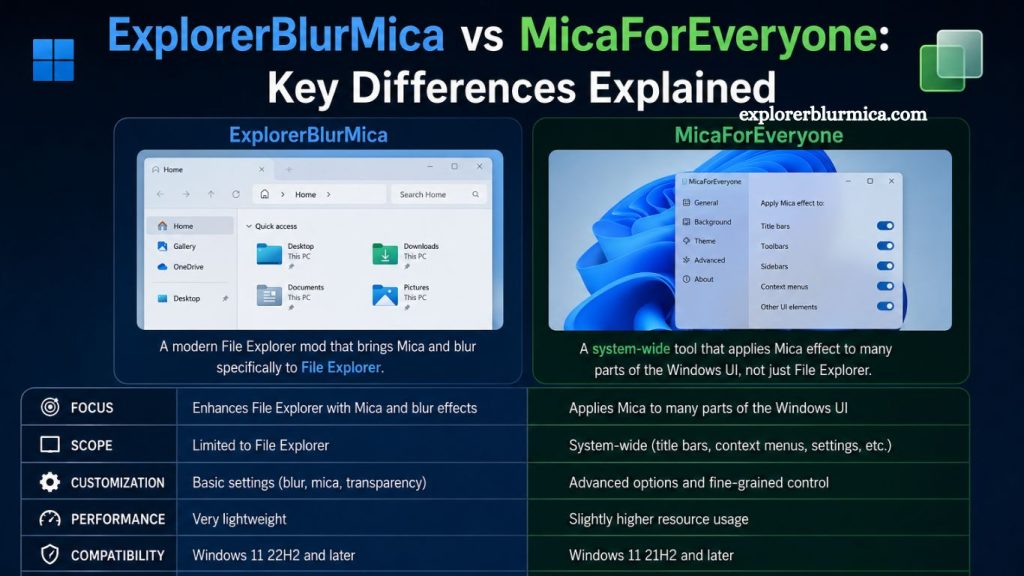
Windows customization has grown rapidly as users seek greater control over visual effects, transparency, and modern UI styling. Two popular tools in this space—ExplorerBlurMica and MicaForEveryone—often get compared because both modify Windows visual appearance, especially the Mica and acrylic-like blur effects.
Although they share a similar goal of improving the Windows aesthetic, they function differently, target different system layers, and offer distinct levels of control. Understanding these differences helps users choose the right tool for performance, stability, and design preferences.
Understanding Mica and Blur Effects in Windows
Before comparing both tools, it helps to understand the visual technology they modify.
Windows 11 introduced the Mica effect, a design material that blends the desktop wallpaper with application surfaces using a subtle blur-and-tint system. It improves visual depth while maintaining performance efficiency compared to older acrylic blur effects.
Read More: ExplorerBlurMica Safety Review: Is It Safe to Use?
However, Microsoft applies Mica inconsistently across applications and system areas. Some windows support it natively, while others remain plain or use older styling. This limitation created demand for third-party tools like ExplorerBlurMica and MicaForEveryone.
Overview of ExplorerBlurMica
ExplorerBlurMica is designed specifically to enhance the visual experience of File Explorer in Windows.
Primary Purpose
ExplorerBlurMica focuses on applying Mica-like blur effects directly to Windows File Explorer. Instead of modifying system-wide appearance rules, it targets a single, heavily used component of the operating system.
Core Functionality
- Enhances File Explorer’s title bar and background transparency
- Applies consistent Mica or blur effects where Windows does not natively support them
- Improves visual uniformity across Explorer windows
- Lightweight design with minimal system interference
- Design Philosophy
The tool prioritizes simplicity and focus. It does not attempt to control all application windows or system UI elements. Instead, it refines one key area that users interact with daily.
Performance Behavior
ExplorerBlurMica is generally lightweight because it limits its scope. Since it modifies only File Explorer, system resource usage remains low, making it suitable for users who want visual enhancement without performance trade-offs.
Overview of MicaForEveryone
MicaForEveryone offers a broader and more advanced approach to UI customization.
Primary Purpose
MicaForEveryone allows users to apply Mica, blur, and transparency effects across multiple application windows—not just File Explorer. It acts as a system-wide visual controller.
Core Functionality
- Applies Mica effects to selected applications
- Turns blur for specific windows on or off
- Provides rule-based customization per app
- Supports advanced configuration for power users
- Offers more granular control over UI appearance
- Design Philosophy
MicaForEveryone is built for flexibility and control. Instead of focusing on a single system component, it lets users define how different applications behave visually.
Performance Behavior
Because it monitors and modifies multiple application windows, it can use slightly more system resources than ExplorerBlurMica. However, it remains optimized for modern Windows systems and generally performs smoothly.
Key Difference: Scope of Customization
The most important difference between the two tools lies in their scope.
ExplorerBlurMica: Narrow Focus
- Targets only the File Explorer
- Delivers consistent styling within one system area
- Simple setup and minimal configuration
MicaForEveryone: System-Wide Control
- Applies effects across multiple applications
- Allows per-app customization rules
- Suitable for advanced personalization
In short, ExplorerBlurMica acts like a precision tool, while MicaForEveryone functions as a full customization platform.
User Interface and Ease of Use
ExplorerBlurMica
ExplorerBlurMica offers a straightforward experience. Users typically install it and immediately see changes in File Explorer without complex configuration. It suits users who prefer:
- Quick setup
- No technical adjustments
- Automatic visual improvement
MicaForEveryone
MicaForEveryone introduces a configuration layer. Users can define rules, select applications, and adjust behavior manually. It suits users who:
- Enjoy system customization
- Want control over individual apps
- Prefer fine-tuned visual settings
This difference makes ExplorerBlurMica beginner-friendly, while MicaForEveryone appeals to advanced users.
- Level of Customization
- ExplorerBlurMica Customization
- Limited to enabling/disabling effects
- Focused on the Explorer window appearance
- Minimal configuration options
- MicaForEveryone Customization
- App-specific rules
- Multiple visual modes
- Control over blur intensity and behavior
- Ability to exclude or include applications
This makes MicaForEveryone significantly more powerful in terms of customization depth.
System Performance Impact
Performance matters for users running multiple applications or lower-spec hardware.
- ExplorerBlurMica Performance
- Low system usage
- Minimal background processing
- Limited scope reduces overhead
- MicaForEveryone Performance
- Slightly higher resource usage
- Manages multiple application hooks
- Still optimized for Windows 11 environments
While both tools are efficient, ExplorerBlurMica has a slight edge in performance due to its limited functionality.
Stability and Compatibility
ExplorerBlurMica
Because it interacts only with File Explorer, it tends to have fewer compatibility issues. Updates to Windows Explorer may occasionally affect behavior, but overall stability remains strong.
MicaForEveryone
Since it interacts with multiple applications, compatibility depends on how different programs handle window rendering. Some apps may require rule adjustments for best results.
Ideal Use Cases
When to Choose ExplorerBlurMica
- You only want an improved File Explorer appearance
- You prefer a lightweight solution
- You want zero configuration effort
- You value system stability above customization
When to Choose MicaForEveryone
- You want system-wide visual consistency
- You prefer customizing individual applications
- You enjoy advanced Windows tweaking
- You need flexible control over blur and transparency
- Visual Consistency Comparison
ExplorerBlurMica improves consistency only within File Explorer, creating a polished but limited enhancement.
MicaForEveryone creates broader consistency across multiple applications, especially useful for users who want a unified modern UI experience across the entire system.
Learning Curve
- ExplorerBlurMica: Very low learning curve
- MicaForEveryone: Moderate learning curve due to rule-based configuration
This difference plays a major role in user choice, especially for non-technical users.
Advantages of ExplorerBlurMica
- Simple and lightweight
- Focused improvement for File Explorer
- Quick installation and setup
- Stable and minimal interference
Advantages of MicaForEveryone
- System-wide Mica control
- High customization flexibility
- Per-application configuration
- Better for power users and enthusiasts
Limitations of Both Tools
ExplorerBlurMica Limitations
- Limited to File Explorer only
- No system-wide customization
- Minimal feature expansion
MicaForEveryone Limitations
- Requires configuration for best results
- Slightly more resource usage
- Compatibility tuning may be needed for some apps
- Final Comparison Summary
ExplorerBlurMica and MicaForEveryone serve different user needs rather than competing directly.
ExplorerBlurMica focuses on simplicity and targeted improvement
MicaForEveryone focuses on control and system-wide customization
Users who want a quick visual upgrade for File Explorer benefit more from ExplorerBlurMica. Users who want full control over Windows appearance and application-specific effects benefit more from MicaForEveryone.
Frequently Asked Questions
What is ExplorerBlurMica used for?
ExplorerBlurMica enhances Windows File Explorer by adding Mica and blur effects for a modern UI look.
What does MicaForEveryone do?
MicaForEveryone allows users to apply Mica and blur effects across multiple applications with customizable rules.
Which tool is better for beginners?
ExplorerBlurMica is better for beginners because it requires minimal setup and works automatically with File Explorer.
Does MicaForEveryone affect system performance?
MicaForEveryone has a slightly higher performance impact since it manages multiple application windows, but it remains optimized.
Can ExplorerBlurMica customize all apps?
No, ExplorerBlurMica only enhances File Explorer and does not support system-wide customization.
Is MicaForEveryone safe to use?
Yes, it is generally safe when downloaded from trusted sources, though users should always verify compatibility with their Windows version.
Which tool offers more customization options?
MicaForEveryone offers more advanced customization options, including per-application rules and system-wide visual control.
Conclusion
ExplorerBlurMica and MicaForEveryone both enhance the Windows 11 visual experience but serve different purposes. ExplorerBlurMica focuses on improving File Explorer with a simple, lightweight Mica-and-blur effect, making it ideal for users who want quick visual upgrades without configuration.